Module 3: Modern Data Protection (CBT & Backups)
Learning Objectives
By the end of this module, you will:
-
Understand how Change Block Tracking (CBT) drastically reduces backup windows
-
Create a Ceph RBD VolumeSnapshot of a running VM’s disk — the same mechanism Fusion CBT uses
-
Observe how Fusion orchestrates snapshots at scale through its Data Protection CRDs
-
Verify VolumeSnapshot resources in the OpenShift Console
Conceptual Background
Change Block Tracking (CBT)
Traditional backup approaches scan the entire filesystem to determine which files have changed — a computationally expensive process that scales poorly with volume size.
IBM Storage Fusion 2.12 uses Change Block Tracking via the Ceph rbd-diff API to:
-
Track changes at the block level, not the filesystem level
-
Bypass the CSI layer entirely for differential calculations
-
Achieve an incremental-forever architecture where only changed blocks are backed up after the initial full backup
This means:
-
First backup: Full copy of all blocks
-
Subsequent backups: Only blocks that changed since the last backup — determined in milliseconds by the Ceph
rbd-diffAPI
Backup Architecture
Fusion Data Protection is built on a layered architecture:
┌─────────────────────────────────────┐
│     Fusion Data Protection UI       │
├─────────────────────────────────────┤
│  BackupPolicy → PolicyAssignment    │  Fusion CRDs
│  BackupStorageLocation → Backup     │  (ibm-spectrum-fusion-ns)
├─────────────────────────────────────┤
│  Guardian Backup-Restore Service    │  Orchestration
│  (Velero + OADP + Kafka + MinIO)    │  (ibm-backup-restore)
├─────────────────────────────────────┤
│  Ceph RBD VolumeSnapshot            │  Storage Layer
│  rbd-diff (CBT)                     │  (openshift-storage)
└─────────────────────────────────────┘
At the bottom of this stack is the VolumeSnapshot — a Ceph RBD snapshot that captures the state of a block device in milliseconds. In this module, you will create VolumeSnapshots directly to experience the core CBT mechanism hands-on.
Fusion Data Protection CRDs
In a production deployment, Fusion automates snapshot scheduling, retention, and replication through a set of Custom Resources:
| CRD | Purpose |
|---|---|
|
Defines where backup data is stored (local snapshots, S3, MCG, Azure) |
|
Defines schedule, retention, and which BSL to use |
|
Links a BackupPolicy to an Application (namespace) |
|
Represents a single backup job and its status |
|
Registers a namespace and its PVCs for data protection |
|
Fusion Dashboard and VM Backups: IBM Fusion has supported virtual machine backup and restore through the Dashboard since version 2.8, including the Backed up applications page, policy management, and incremental VM backups. Full Dashboard integration requires a multi-cluster hub-spoke topology:
This workshop cluster (Fusion 2.12 on OCP 4.18) has RHACM installed but operates as a single cluster without a separate hub for spoke registration. The Fusion For more details, see: |
Step 1: Verify the VM from Module 2
Confirm your VM from Module 2 is still running:
oc get vm {user}-testvm -n {user_namespace}Expected output:
NAME            AGE   STATUS    READY
user1-testvm    ...   Running   True
Also verify the VM’s PVC (the disk we will snapshot):
oc get pvc -n {user_namespace}You should see {user}-testvm-rootdisk with access mode RWX and storage class ocs-storagecluster-ceph-rbd-virtualization.
|
If the VM is not running, go back to Module 2 and create it before continuing. |
Step 2: Examine Available Snapshot Classes
Before creating a snapshot, check which VolumeSnapshotClasses are available:
oc get volumesnapshotclassYou should see ocs-storagecluster-rbdplugin-snapclass — this is the Ceph RBD snapshot class that enables CBT.
Step 3: Create a VolumeSnapshot (First Backup)
Create a point-in-time snapshot of the VM’s root disk. This is the exact same Ceph RBD snapshot mechanism that Fusion’s CBT uses under the hood:
cat <<EOF | oc apply -f -
apiVersion: snapshot.storage.k8s.io/v1
kind: VolumeSnapshot
metadata:
  name: {user}-testvm-snapshot-001
  namespace: {user_namespace}
spec:
  volumeSnapshotClassName: ocs-storagecluster-rbdplugin-snapclass
  source:
    persistentVolumeClaimName: {user}-testvm-rootdisk
EOF
Step 4: Verify the Snapshot
Check the snapshot status:
oc get volumesnapshot {user}-testvm-snapshot-001 -n {user_namespace}Expected output:
NAME                        READYTOUSE   SOURCEPVC              RESTORESIZE   SNAPSHOTCLASS                            CREATIONTIME   AGE
user1-testvm-snapshot-001   true         user1-testvm-rootdisk  10Gi          ocs-storagecluster-rbdplugin-snapclass   <timestamp>    <age>
|
Notice how fast the snapshot was created — typically under 1 second. This is because Ceph RBD snapshots are copy-on-write: the snapshot only records which blocks exist at that moment. No data is physically copied. This is the foundation of CBT’s speed. |
For more detail, inspect the snapshot content:
oc get volumesnapshot {user}-testvm-snapshot-001 -n {user_namespace} -o jsonpath='{.status}' | python3 -m json.toolKey fields to note:
-
readyToUse: true— the snapshot is immediately available -
restoreSize: 10Gi— the logical size of the snapshotted volume -
creationTime— the exact point-in-time when the snapshot was taken
You can also see the snapshot in the OpenShift Console. Navigate to Storage > VolumeSnapshots and select your project {user_namespace}.
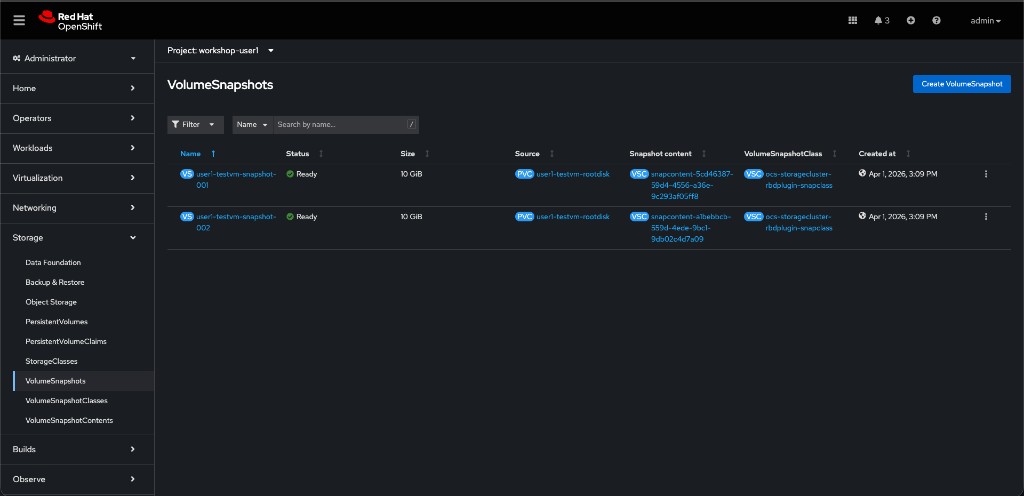
Step 5: Create a Second Snapshot (Incremental)
Create a second snapshot to simulate an incremental backup point:
cat <<EOF | oc apply -f -
apiVersion: snapshot.storage.k8s.io/v1
kind: VolumeSnapshot
metadata:
  name: {user}-testvm-snapshot-002
  namespace: {user_namespace}
spec:
  volumeSnapshotClassName: ocs-storagecluster-rbdplugin-snapclass
  source:
    persistentVolumeClaimName: {user}-testvm-rootdisk
EOF
Compare both snapshots:
oc get volumesnapshot -n {user_namespace}Both snapshots complete in under a second. In a full Fusion backup, the system would now use rbd diff between these two snapshots to determine which blocks changed — and only transfer those blocks to the backup target.
How CBT Works Under the Hood
Traditional Backup:
  Filesystem scan → Identify changes → Read changed files → Transfer
  Time complexity: O(total files)

CBT with rbd-diff:
  Ceph snapshot diff → Identify changed blocks → Transfer blocks
  Time complexity: O(changed blocks)
The Fusion backup controller:
-
Takes a Ceph RBD snapshot of the VM’s PVC (what you just did manually)
-
Calls
rbd diffto compute the block-level delta against the previous snapshot -
Streams only the changed blocks to the backup target (MinIO / MCG / S3)
-
Records the snapshot metadata for the next incremental
This completely bypasses:
-
CSI layer overhead
-
Filesystem-level scanning
-
Application-level quiescing (for crash-consistent backups)
Job Hooks (Advanced)
For application-consistent backups (e.g., databases), Fusion supports Job Hooks — pre/post-backup scripts that can:
-
Freeze the application (e.g.,
FLUSH TABLES WITH READ LOCK) -
Trigger the snapshot
-
Thaw the application
There isn’t time to configure a Job Hook today, but know they exist for production database workloads.
Step 6: Clean Up
Remove the snapshots before moving on:
oc delete volumesnapshot {user}-testvm-snapshot-001 {user}-testvm-snapshot-002 -n {user_namespace}|
Do not delete the VM itself — you may use it in later modules. |
Optional: Fusion Backup Dashboard with Multi-Cluster Hub-Spoke
The hands-on steps above demonstrate the core CBT mechanism using VolumeSnapshots on a single cluster. To see backup policies and protected applications in the Fusion Dashboard, you need a multi-cluster hub-spoke deployment.
What You Would Need
┌──────────────────────────┐         ┌──────────────────────────┐
│       Hub Cluster        │         │     Spoke Cluster        │
│                          │         │   (this workshop cluster)│
│  RHACM + MultiClusterHub│         │  Fusion Backup Agent     │
│  Fusion Dashboard        │◄───────►│  Velero / OADP           │
│  Guardian Services       │  Kafka  │  Connection CR → Hub     │
│  Kafka Bridge            │  Bridge │                          │
└──────────────────────────┘         └──────────────────────────┘
-
Hub cluster: A separate OpenShift cluster with RHACM and the Fusion Backup & Restore hub service installed. The hub hosts the Fusion Dashboard, guardian services, and the Kafka bridge endpoint.
-
Spoke registration: From the hub’s Fusion UI, generate a connection snippet. Install the Backup & Restore spoke on this workshop cluster using that snippet. This creates the
Connection.application.isf.ibm.comCR that links the spoke to the hub. -
Policy workflow: Once connected,
BackupPolicyandPolicyAssignmentresources created on this cluster flow through the Kafka bridge to the guardian services on the hub. Backups are executed by Velero/OADP on the spoke and tracked in the hub’s Dashboard.
Why It Cannot Run on a Single Cluster
The Fusion Connection CR requires a remote cluster API endpoint. An admission webhook explicitly blocks self-referential connections:
admission webhook "vconnection.kb.io" denied the request:
connection has the same apiserver with local cluster
This is by design — the hub-spoke architecture separates backup orchestration (hub) from backup execution (spoke) for scalability and disaster recovery isolation.
Hands-On Steps (If a Hub Is Available)
If your environment includes a second cluster configured as a Fusion backup hub:
-
Obtain the connection snippet from the hub cluster’s Fusion UI (Backup & restore > Clusters > Add cluster)
-
Install the Backup & Restore spoke on this cluster using the snippet
-
Verify the
ConnectionCR was created:oc get connection.application.isf.ibm.com -n ibm-spectrum-fusion-ns -
Create a
BackupPolicyandPolicyAssignment:cat <<EOF | oc apply -f - apiVersion: data-protection.isf.ibm.com/v1alpha1 kind: BackupPolicy metadata: name: {user}-vm-backup-policy namespace: ibm-spectrum-fusion-ns spec: backupStorageLocation: isf-dp-inplace-snapshot provider: isf-backup-restore retention: number: 3 unit: day --- apiVersion: data-protection.isf.ibm.com/v1alpha1 kind: PolicyAssignment metadata: name: {user}-vm-policy-assignment namespace: ibm-spectrum-fusion-ns spec: application: {user_namespace} backupPolicy: {user}-vm-backup-policy runNow: true EOF -
Verify in the Fusion Dashboard on the hub: Backup & restore > Policies and Backed up applications
-
Verify in the OpenShift Console: Storage > Backup & Restore
-
Clean up when done:
oc delete policyassignment {user}-vm-policy-assignment -n ibm-spectrum-fusion-ns
oc delete backuppolicy {user}-vm-backup-policy -n ibm-spectrum-fusion-ns
|
For details on setting up the hub-spoke topology, see Backup & Restore spoke installation in the IBM Fusion documentation. |
References
|
Facilitator Notes: While the snapshots create, explain the Fusion 2.12 native integration with the Ceph |