Module 4: AI-Driven Data Cataloging with MCP
Learning Objectives
By the end of this module, you will:
-
Understand what IBM Fusion Data Cataloging Service (DCS) provides for unstructured data governance
-
Explain the Model Context Protocol (MCP) and how it enables AI agents to interact with enterprise data catalogs
-
Understand how Red Hat OpenShift Lightspeed integrates with the DCS MCP Server for on-cluster natural language catalog exploration
-
(Hands-on) Load sample data into an S3 bucket, register it in DCS, enable the MCP Server, and explore catalog metadata through Lightspeed
Conceptual Background
The Unstructured Data Challenge
Enterprises generate massive volumes of unstructured data across distributed storage platforms. Teams struggle with three persistent problems:
-
Data is difficult to discover and understand — datasets are spread across multiple platforms, poorly documented, and hard to explore
-
Metadata becomes outdated and inconsistent — as pipelines evolve and new sources are introduced, documentation falls out of sync
-
Data teams are overloaded with manual work — engineers spend too much time maintaining documentation and answering repetitive questions instead of innovating
Traditional approaches — manual tagging, static reports, hand-written SQL queries across schemas — simply do not scale.
IBM Fusion Data Cataloging Service (DCS)
IBM Fusion Data Cataloging Service (also known as FDC or DCS) is a component of IBM Storage Fusion 2.12+ that provides automated metadata discovery, classification, and governance for data stored across Fusion-managed storage systems.
DCS continuously indexes data sources, extracts metadata, applies policy-driven classification, and maintains a searchable catalog of all data assets. It runs as a set of pods in the ibm-data-cataloging namespace on your OpenShift cluster.
Model Context Protocol (MCP)
The Model Context Protocol is an open standard (JSON-RPC 2.0) that enables Large Language Models to securely interact with external tools, data, and services without hard-coded integrations.
How MCP works:
-
Tool Discovery — AI agents query the MCP server at runtime to discover available capabilities
-
Conversational Interface — users ask natural language questions; the agent translates them into MCP tool calls
-
Universal Compatibility — MCP works with any compatible LLM client (OpenAI, IBM watsonx, Claude, Ollama, and others)
-
Structured Communication — instead of building custom API connectors for each model, MCP provides a single protocol layer
DCS exposes an MCP Server that allows LLMs to read and write catalog metadata, discover datasets, apply tags, and run classification workflows — all through natural language.
OpenShift Lightspeed (OLS)
Red Hat OpenShift Lightspeed is an AI assistant integrated directly into the OpenShift web console. In this workshop, OLS is configured with OpenAI GPT-4o as the LLM backend, providing:
-
A chat panel accessible from any page in the OpenShift console
-
Natural language queries about cluster resources, troubleshooting, and — through MCP — data catalog exploration
-
On-cluster experience that requires no external LLM client configuration
Architecture
The end-to-end flow for AI-driven catalog exploration:
Workshop Attendee
    │
    ▼
OpenShift Console ──► Lightspeed Chat Panel
    │                        │
    │                        ▼
    │                  OpenAI API (GPT-4o)
    │                        │
    │                        ▼ (MCP Tool Calls - JSON-RPC 2.0)
    │                  DCS MCP Server
    │                  (ibm-data-cataloging namespace)
    │                        │
    │                        ▼
    │                  Data Catalog
    │                  (Metadata + Tags + Classifications)
    │                        │
    │                        ▼
    │                  Storage Sources
    │                  (Fusion, S3, NFS)
The key insight: MCP transforms storage from a passive data repository into an AI-native resource that can be explored, enriched, and governed through conversation.
Prerequisites Check
Before proceeding with the hands-on exercises, verify the following prerequisites are met on your cluster.
Check 1: Fusion Version
oc get csv -n ibm-spectrum-fusion-ns -o custom-columns='NAME:.metadata.name,DISPLAY:.spec.displayName,VERSION:.spec.version' | grep -i fusionThe output should show version 2.12 or higher. If your cluster runs an earlier version, skip to the Conceptual Walkthrough section.
Check 2: Data Cataloging Service
oc get namespace ibm-data-cataloging 2>/dev/null && echo "DCS namespace exists" || echo "DCS namespace NOT found"oc get pods -n ibm-data-cataloging --no-headers 2>/dev/null | head -10You should see pods running in the ibm-data-cataloging namespace. If the namespace does not exist, DCS may not be installed — skip to the Conceptual Walkthrough section.
Check 3: OpenShift Lightspeed
oc get csv -A | grep -i lightspeedVerify the Lightspeed operator is installed and the chat panel is visible in the OpenShift console (look for the Lightspeed icon in the top navigation bar).
|
If any of these prerequisites are not met, proceed directly to the Conceptual Walkthrough section for a guided overview of the DCS MCP capabilities. |
Hands-on: Verify Sample Data
Before enabling the MCP Server, you need data in the catalog for the AI to explore. The workshop deploys an automated dcs-setup Job that handles the full ingestion pipeline: creating an S3 bucket, generating sample data, registering the data source in DCS, and triggering a catalog scan. In this section you will verify that the Job completed and the catalog is populated.
Step 1: Verify the Setup Job
The dcs-setup Job runs automatically during workshop provisioning. Check its status:
oc get job dcs-setup -n ibm-data-catalogingYou should see COMPLETIONS 1/1. If the Job is still running, wait a minute and re-check.
To view the Job’s full output:
oc logs job/dcs-setup -n ibm-data-cataloging -c setup --tail=30Step 2: Verify the Data Connection
Confirm the S3 connection was registered and is online:
DCS_TOKEN=$(oc exec -n ibm-data-cataloging deploy/isd-proxy -- \
  curl -s "http://auth.ibm-data-cataloging.svc:80/auth/v1/token" \
    -u "sdadmin:$(oc get secret keystone -n ibm-data-cataloging -o jsonpath='{.data.password}' | base64 -d)" \
    -D /dev/stderr 2>&1 | grep -i 'x-auth-token' | awk '{print $2}' | tr -d '\r\n')
oc exec -n ibm-data-cataloging deploy/isd-proxy -- \
  curl -s "http://connmgr.ibm-data-cataloging.svc:80/connmgr/v1/connections" \
    -H "Authorization: Bearer ${DCS_TOKEN}" \
  | python3 -c "
import sys,json
conns = json.load(sys.stdin)
for c in conns:
    print(f\"Connection: {c['name']}  |  Platform: {c['platform']}  |  Online: {c['online']}  |  Records: {c['total_records']}\")
"
You should see a connection named workshop-sample-data with Online: 1 and a non-zero record count.
Step 3: Verify the Catalog
Confirm files have been cataloged by querying the DB2 catalog database:
oc exec -n ibm-data-cataloging c-isd-db2u-0 -c db2u -- su - db2inst1 -c \
  'printf "connect to BLUDB;\nSELECT FILETYPE, COUNT(*) AS CNT FROM BLUADMIN.METAOCEAN GROUP BY FILETYPE;\n" | db2 -t' \
  2>/dev/null | grep -E "^\w"
You should see a breakdown by file type (csv, json, log, pdf, yaml) totaling approximately 25 files.
Step 4: Explore the Data in the DCS Console (Optional)
For a visual overview of the cataloged data, open the DCS web console:
-
Navigate to: {dcs_console_url}
The DCS admin username is
sdadmin. Retrieve the password:oc get secret keystone -n ibm-data-cataloging -o jsonpath='{.data.password}' | base64 -d && echo -
Click the hamburger menu (☰) and navigate to Data connections > Connections
-
You should see the
workshop-sample-dataconnection with a green "Online" indicator: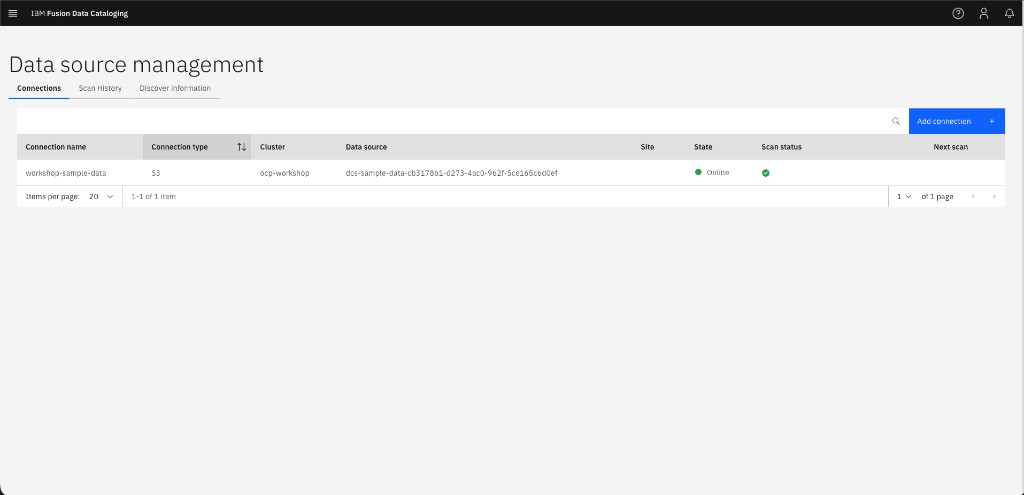
-
Click Metadata > Data Catalog to browse the indexed files, their types, and sizes
|
The DCS Dashboard may show "Records indexed: 0" even though the data IS in the catalog: 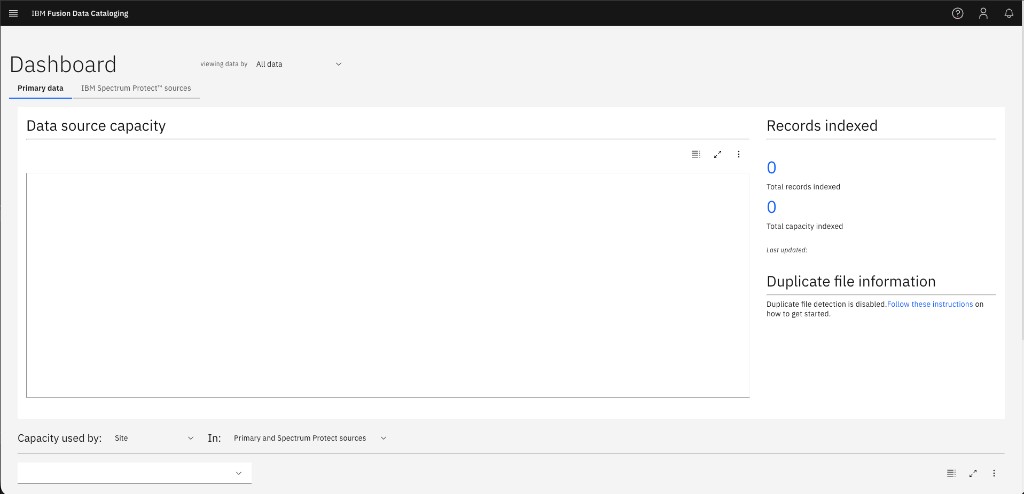
This is a cosmetic discrepancy — the dashboard counter tracks a separate indexing pipeline stage. The catalog records in the METAOCEAN table are fully populated and queryable via MCP, as you confirmed in Step 3. |
Step 4b: Add Your Own Data (Optional)
Want to catalog your own files? You can upload additional data to the S3 bucket that the workshop created.
-
Extract the S3 credentials:
export AWS_ACCESS_KEY_ID=$(oc get secret dcs-sample-data -n {user_namespace} -o jsonpath='{.data.AWS_ACCESS_KEY_ID}' | base64 -d) export AWS_SECRET_ACCESS_KEY=$(oc get secret dcs-sample-data -n {user_namespace} -o jsonpath='{.data.AWS_SECRET_ACCESS_KEY}' | base64 -d) export BUCKET_NAME=$(oc get obc dcs-sample-data -n {user_namespace} -o jsonpath='{.spec.bucketName}') export S3_ENDPOINT={s3_endpoint} -
Install the AWS CLI (if not already available):
pip install --user awscli 2>/dev/null && export PATH=$HOME/.local/bin:$PATH -
Upload your files:
aws --endpoint-url ${S3_ENDPOINT} --no-verify-ssl \ s3 cp /path/to/your/file.csv s3://${BUCKET_NAME}/custom/file.csv -
Trigger a rescan from the DCS console: navigate to Data connections > Connections, click the three-dot menu (⋮) next to
workshop-sample-data, and select Scan. Alternatively, trigger via the API:DCS_TOKEN=$(oc exec -n ibm-data-cataloging deploy/isd-proxy -- \ curl -s "http://auth.ibm-data-cataloging.svc:80/auth/v1/token" \ -u "sdadmin:$(oc get secret keystone -n ibm-data-cataloging -o jsonpath='{.data.password}' | base64 -d)" \ -D /dev/stderr 2>&1 | grep -i 'x-auth-token' | awk '{print $2}' | tr -d '\r\n') oc exec -n ibm-data-cataloging deploy/isd-proxy -- \ curl -s -X POST "http://connmgr.ibm-data-cataloging.svc:80/connmgr/v1/scan/workshop-sample-data" \ -H "Authorization: Bearer ${DCS_TOKEN}"After the scan completes (~1-2 minutes), your files will appear in the catalog and be queryable through Lightspeed.
|
Manual setup fallback: If the Alternatively, refer to the setup script at |
Hands-on: Enable the DCS MCP Server
Step 5: Enable Natural Language Queries
The DCS MCP Server must be explicitly enabled. Patch the SpectrumDiscover custom resource:
DCS_NS=ibm-data-cataloging

oc -n ${DCS_NS} patch SpectrumDiscover \
  $(oc -n ${DCS_NS} get spectrumdiscover -o jsonpath='{.items[*].metadata.name}') \
  --type=merge -p '{
    "spec": {
      "enabled_features": {
        "natural-language-queries": {
          "enabled": true
        }
      }
    }
  }'
Step 6: Verify MCP Server Pods
Wait for the MCP server pods to start:
oc -n ibm-data-cataloging get pod -l 'app=isd,role=dcs-ai-mcp-server' --watchPress Ctrl+C once the pods show Running status.
Step 7: Retrieve the MCP Endpoint
Get the route for the MCP HTTP endpoint:
MCP_URL="https://$(oc -n ibm-data-cataloging get route dcs-mcp-route -o jsonpath='{.spec.host}')/mcp/http"
echo "MCP endpoint: ${MCP_URL}"
This is the Streamable HTTP endpoint that Lightspeed connects to. The workshop has already configured OLSConfig with this URL — no manual configuration needed.
Hands-on: Explore the Catalog via OpenShift Lightspeed
Step 8: Open the Lightspeed Chat Panel
-
Navigate to the OpenShift web console: {openshift_console_url}
-
Look for the Lightspeed icon in the top navigation bar (or the side panel)
-
Click to open the chat panel
Step 8b: Authenticate Lightspeed with DCS
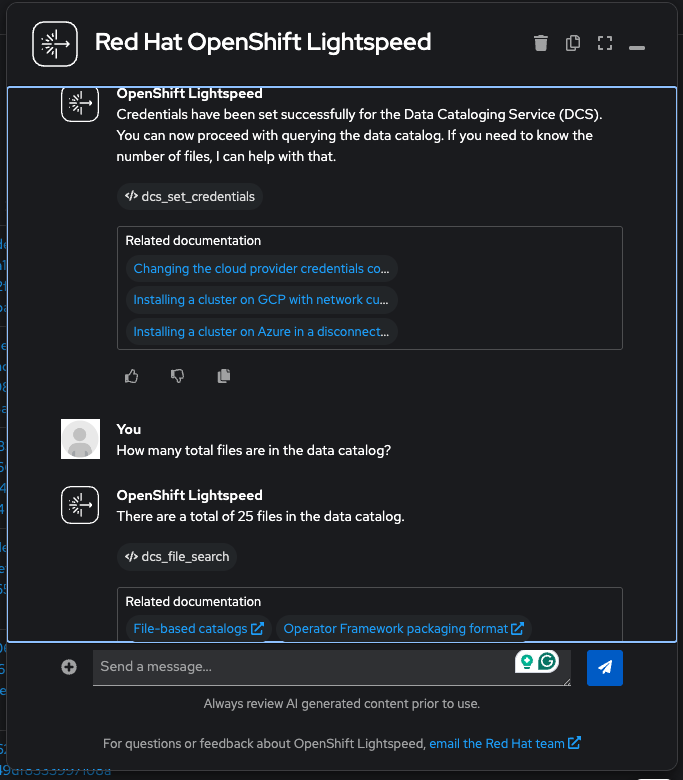
The DCS MCP Server has its own authentication layer (IBM Keystone) that is separate from OpenShift RBAC. Even though Lightspeed already knows the MCP endpoint URL, each chat session must authenticate with DCS credentials before any catalog queries will work. This is a one-time step per conversation.
Run this command to build the ready-to-paste authentication message:
DCS_PW=$(oc get secret keystone -n ibm-data-cataloging -o jsonpath='{.data.password}' | base64 -d)
API_HOST=$(echo "{cluster_domain}" | sed 's/^apps\./api./')
API_URL="https://$API_HOST:6443"
echo ""
echo "╔══════════════════════════════════════════════════════════════╗"
echo "║  Copy the message below and paste it into Lightspeed chat:  ║"
echo "╚══════════════════════════════════════════════════════════════╝"
echo ""
echo "Use the dcs_set_credentials tool with these exact values:"
echo "  cluster_url: ${API_URL}"
echo "  username: sdadmin"
echo "  password: ${DCS_PW}"
Copy the entire output (all four lines starting with "Use the dcs_set_credentials tool…") and paste it into the Lightspeed chat panel. The structured format ensures Lightspeed passes the parameters correctly to the MCP tool. You should see a confirmation: "Token generated successfully for sdadmin".
|
Do not reword or shorten the message. The LLM needs the exact parameter names ( |
|
Why is this needed? The DCS MCP Server is a multi-tenant gateway — it does not inherit your OpenShift identity. Each session authenticates with DCS-specific credentials (the |
|
If Lightspeed does not recognize the DCS tools, verify that the MCP feature is enabled by checking the chat panel’s tool indicator. The |
Step 9: Query the Data Catalog
With authentication complete, try the following natural language queries in the Lightspeed chat panel.
|
How it works under the hood: When you ask a question, GPT-4o translates it into a SQL query against the DCS |
|
Metadata queries only — not file contents. DCS is a metadata catalog, not a full-text search engine. The MCP tools query the METAOCEAN table, which stores information about files (name, type, size, path, timestamps, owner, tags) but does not read or index the actual contents of those files. You CAN ask: "What are the largest PDF files?" "Show me files modified this week." "Which files are tagged as sensitive?" You CANNOT ask: "Summarize the OpenShift architecture PDF." "What IP addresses appear in the log files?" "Show me the customer names in customer-directory.csv." Think of it like a library card catalog: you can search by title, author, and subject — but you can’t read the book through the catalog. |
Discovery queries:
-
"How many total files are in the data catalog?"
-
"What file types are present in the catalog and how many of each?"
-
"Show me all PDF documents with their filenames and sizes"
Metadata exploration:
-
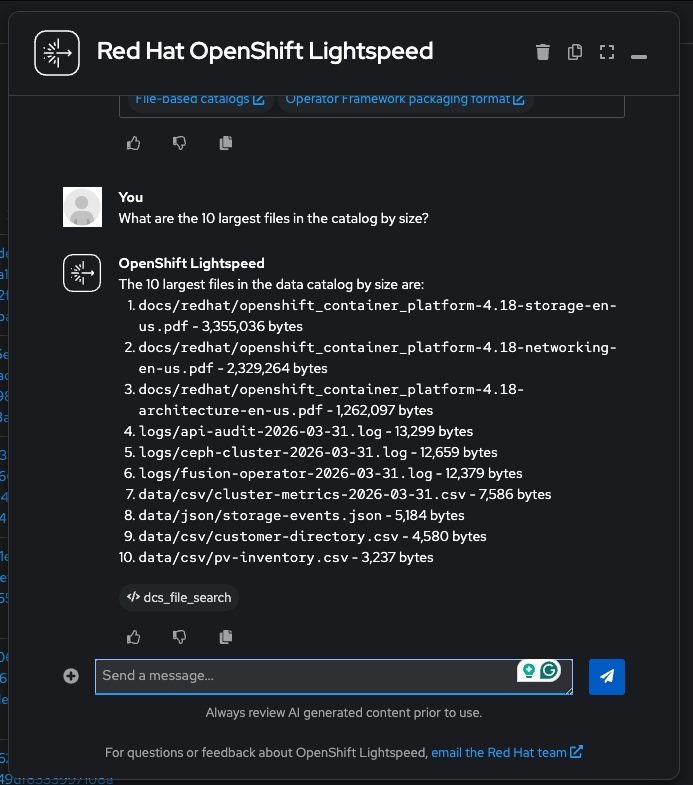
"What are the 10 largest files in the catalog by size?"
-
"Show me all files under the logs/ directory path"
-
"Which files were most recently added to the catalog? Sort by insert time."
-
"List all CSV files with their filenames, sizes, and paths"
Tags and governance:
-
"What tags are currently registered in the system?"
-
"What policies exist in the catalog?"
Step 10: AI-Driven Tagging and Classification
MCP enables the LLM to not just read the catalog, but also enrich it. The available tools include dcs_create_tag, dcs_create_policy, dcs_get_recommend_tags, and dcs_get_registered_tags. Try the following:
-
First, ask Lightspeed to analyze your data and recommend tags:
-
"Analyze the file types and paths in the catalog and recommend meaningful tags for classifying them"
Lightspeed will call
dcs_get_recommend_tagswith a SQL query to explore the data, then propose tags based on what it finds: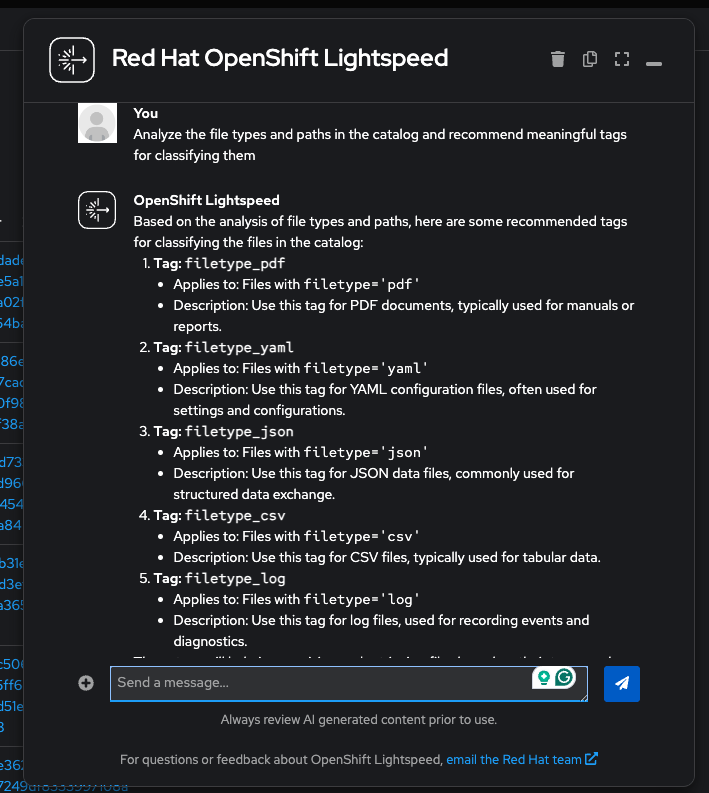
-
-
Create a tag (DCS stores tag names in UPPERCASE automatically):
-
"Create a tag called DOC_CATEGORY with type VARCHAR(256)"
-
-
Create an auto-tagging policy. Try asking Lightspeed:
-
"Create an AUTOTAG policy called classify-pdfs that filters on filetype='pdf', runs NOW, and sets DOC_CATEGORY to reference-guide"
If the policy creation fails with "'tags' parameter is required and must be a map" — this is a known limitation. The
dcs_create_policytool requirestagsas a JSON object, and some LLMs struggle to construct nested objects in tool calls. Use the terminal fallback below to create the policy directly via the MCP server:MCP_HOST=$(oc -n ibm-data-cataloging get route dcs-mcp-route -o jsonpath='{.spec.host}') DCS_PW=$(oc get secret keystone -n ibm-data-cataloging -o jsonpath='{.data.password}' | base64 -d) API_HOST=$(echo "{cluster_domain}" | sed 's/^apps\./api./') SID=$(curl -sk "https://$MCP_HOST/mcp/http" \ -H "Content-Type: application/json" -H "Accept: application/json, text/event-stream" \ -D /dev/stderr -o /dev/null \ -d '{"jsonrpc":"2.0","id":1,"method":"initialize","params":{"protocolVersion":"2025-03-26","capabilities":{},"clientInfo":{"name":"cli","version":"1.0"}}}' \ 2>&1 | grep -i mcp-session-id | awk '{print $2}' | tr -d '\r\n') curl -sk "https://$MCP_HOST/mcp/http" \ -H "Content-Type: application/json" -H "Accept: application/json, text/event-stream" \ -H "Mcp-Session-Id: $SID" \ -d "{\"jsonrpc\":\"2.0\",\"id\":2,\"method\":\"tools/call\",\"params\":{\"name\":\"dcs_set_credentials\",\"arguments\":{\"cluster_url\":\"https://$API_HOST:6443\",\"username\":\"sdadmin\",\"password\":\"$DCS_PW\"}}}" > /dev/null 2>&1 echo "Creating policy classify-pdfs..." curl -sk "https://$MCP_HOST/mcp/http" \ -H "Content-Type: application/json" -H "Accept: application/json, text/event-stream" \ -H "Mcp-Session-Id: $SID" \ -d '{"jsonrpc":"2.0","id":3,"method":"tools/call","params":{"name":"dcs_create_policy","arguments":{"policyName":"classify-pdfs","polFilter":"filetype='"'"'pdf'"'"'","schedule":"NOW","tags":{"DOC_CATEGORY":"reference-guide"}}}}' 2>/dev/null | grep -o '"text":"[^"]*"' | cut -d'"' -f4This calls the same MCP tool (
dcs_create_policy) with the same JSON-RPC protocol that Lightspeed uses — the only difference is that the terminal constructs thetagsobject directly instead of relying on the LLM.
-
-
Verify what was created — ask Lightspeed (these read-only queries work reliably):
-
"Show me all registered tags and their types"
-
"List all policies in the system and their execution status"
You should see the
classify-pdfspolicy with statuscompleteand 3 PDFs tagged. You can also check in the DCS console under Tag management: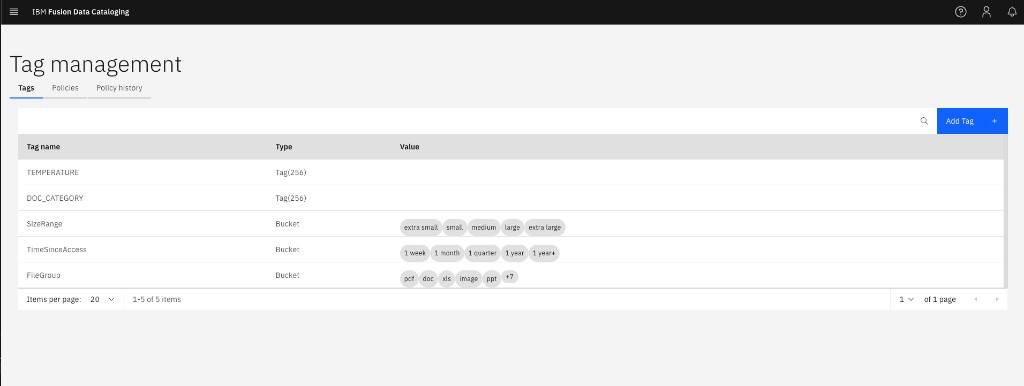
-
|
This demonstrates a real-world pattern: LLMs excel at reading data through MCP tools (queries, listing tags, summarizing metadata) but can be unreliable when writing (creating policies with complex nested parameters). Robust implementations use MCP for discovery and conversational analysis, with programmatic fallbacks for mutations. |
Step 11: Explore the Catalog with Natural Language
Now use Lightspeed to explore the catalog using only natural language — no SQL required. The LLM translates each question into SQL behind the scenes via MCP tool calls.
-
Verify the policy you created is active and has completed:
-
"List all policies in the system and their execution status"
(Lightspeed calls
dcs_get_policies) — You should seeclassify-pdfswith actionAUTOTAG, statuscomplete, and 3 files processed: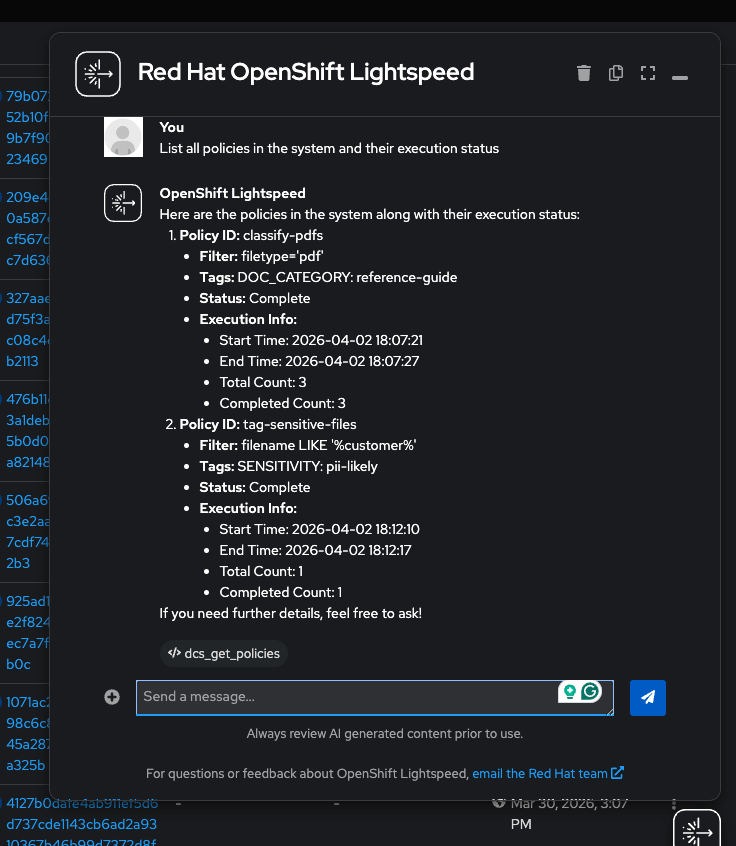
-
-
Explore the catalog by file type:
-
"What file types are present in the catalog and how many of each?"
(Lightspeed calls
dcs_file_search) — You should see yaml (13), csv (3), json (3), log (3), pdf (3) totaling 25 files: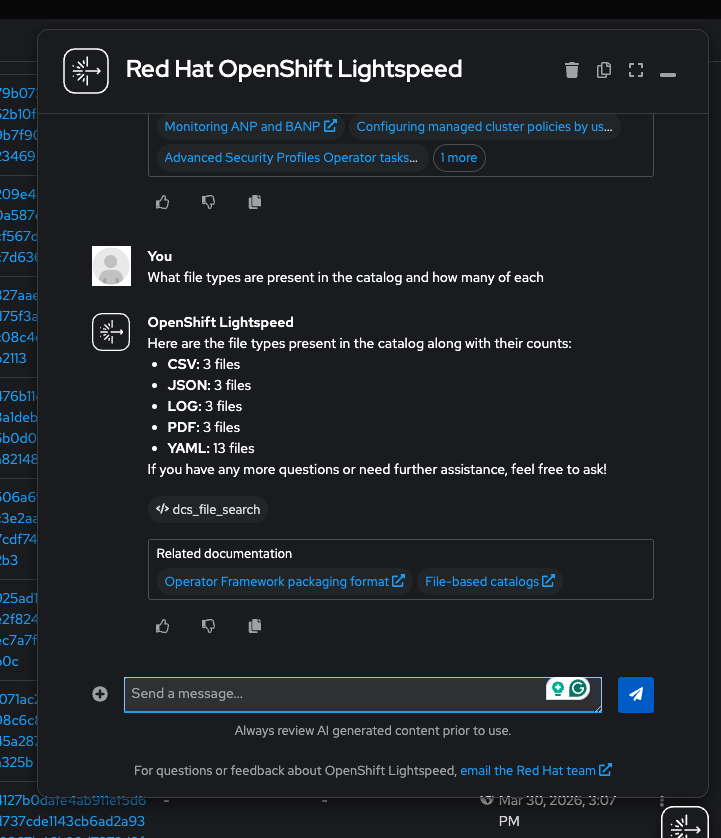
-
-
Identify files that may need attention based on naming patterns:
-
"Which files have names containing 'customer' or 'audit'? Show the filename, filetype, and size."
(Lightspeed calls
dcs_file_search) — Lightspeed will findcustomer-directory.csv(4,580 bytes) andapi-audit-2026-03-31.log(13,299 bytes) — files that could contain PII or sensitive operations data.
-
-
Analyze storage consumption:
-
"What is the total storage consumed by each file type?"
(Lightspeed calls
dcs_file_search) — You will see PDFs dominate at ~6.9 MB (documentation), while YAML manifests consume only ~5 KB despite having the most files: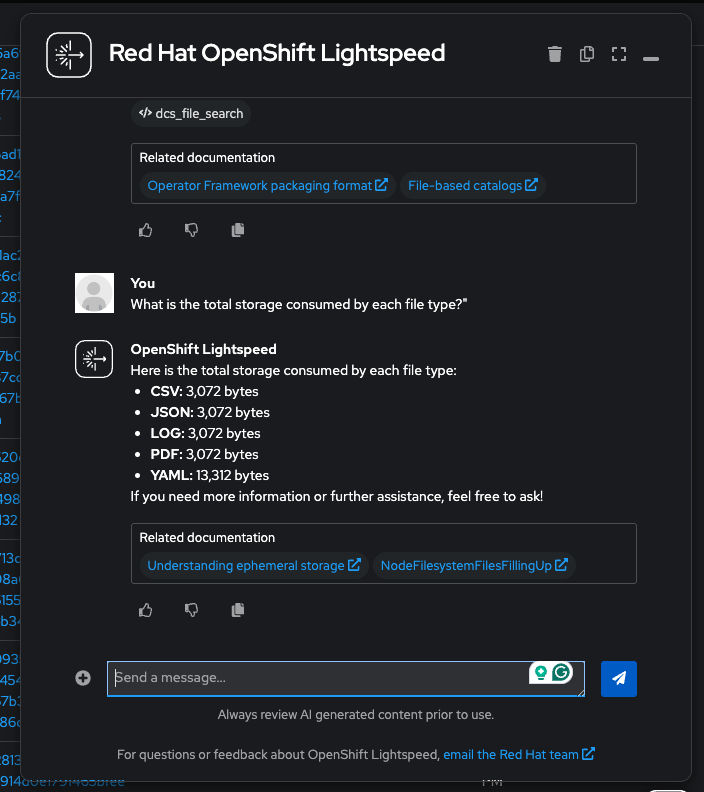
-
-
Check the most recent additions:
-
"What are the 5 most recently added files in the catalog?"
(Lightspeed calls
dcs_file_search) — Shows the latest files by insertion timestamp.
-
-
Review the tag landscape:
-
"What tags are currently registered in the system?"
(Lightspeed calls
dcs_get_registered_tags) — Lists all tags with their data types: COLLECTION, TEMPERATURE, DOC_CATEGORY, and any others you created.
-
|
Going further: Security Risk Assessment. The IBM Community article demonstrates a full end-to-end security workflow where an LLM creates classification tags (e.g., |
Conceptual Walkthrough
|
This section covers the same concepts as the hands-on exercises above, presented as a guided walkthrough for environments where DCS or OLS is not yet available. |
How DCS MCP Transforms Data Governance
Traditional data catalog operations require specialized knowledge — crafting SQL queries across schemas, manually tagging datasets, and producing static compliance reports. This process is:
-
Time-consuming — security assessments can take days across large catalogs
-
Error-prone — manual classification is inconsistent and hard to maintain
-
Non-scalable — effort grows linearly with data volume
With the DCS MCP Server, an AI agent can perform these same operations in minutes:
| Traditional Approach | MCP-Enabled Approach |
|---|---|
Manual SQL queries to discover datasets |
"What data sources are in the catalog?" |
Hand-written tagging rules |
"Recommend and apply tags based on content analysis" |
Periodic manual security audits |
"Perform a security risk assessment and generate a summary" |
Static PDF reports |
Interactive, conversational dashboards generated on demand |
The MCP Request Flow
When a user asks a natural language question through Lightspeed:
-
Lightspeed sends the query to the OpenAI GPT-4o model
-
The model determines which MCP tools are needed (e.g.,
dcs_file_search,dcs_get_registered_tags,dcs_create_tag) -
Lightspeed sends JSON-RPC 2.0 tool invocation requests to the DCS MCP Server
-
The MCP Server executes the operations against the Data Catalog
-
Results flow back through the chain to the user as a natural language response
The model’s native tool-use capabilities make it particularly effective for multi-step catalog exploration tasks.
Use Case: Security Risk Assessment
The IBM Community article by Paul Llamas Virgen demonstrates a compelling real-world scenario:
-
Challenge: Security teams lack a consolidated view of data risks across ingested datasets. Sensitive data may be poorly classified or not identified at all.
-
MCP-Enabled Solution:
-
The LLM scans all catalog metadata through MCP tools
-
It identifies datasets that may contain sensitive information (PII, financial data, credentials)
-
It recommends classification tags based on observed patterns
-
Tags are applied programmatically across all matching assets
-
A security posture dashboard is generated summarizing the findings
-
-
Result: What previously required days of manual SQL queries and spreadsheet analysis is accomplished through a conversational interaction in minutes.
Key Takeaways
-
MCP transforms storage into an AI-native resource — data catalogs become conversational, not transactional
-
IBM DCS speaks the language of AI agents — the MCP Server exposes catalog capabilities as tools that any compatible LLM can invoke
-
Enterprise tagging becomes intelligent — automated classification at scale replaces manual, inconsistent tagging
-
OpenShift Lightspeed keeps it on-cluster — no external LLM clients needed; workshop attendees use the same console they already know
Connection to Workshop Themes
This module bridges the operational storage foundations you built in earlier modules with the AI-native future explored in Module 5:
| Earlier Module | Connection to Data Cataloging |
|---|---|
DCS catalogs and classifies data across the same Ceph-based storage classes you provisioned |
|
Backup policies can be informed by catalog metadata — protect sensitive data first |
|
Content-Aware Storage (CAS) builds on DCS metadata for intelligent data tiering in AI pipelines |
References
|
Facilitator Notes: This module has two paths. If Fusion 2.12+ and OLS are deployed, walk through the hands-on exercises — the security risk assessment demo is the most impactful. If prerequisites are not met, use the conceptual walkthrough and emphasize how MCP changes the data governance paradigm. Either way, tie the DCS capabilities back to Module 1 (storage architecture) and forward to Module 5 (AI-native operations with CAS and GIE). |